Tutor Booking Software: How Families Book Sessions, Pay, and Get Reminders in One Place

When you run tutoring or private lessons, every booking creates several administrative tasks.
You need to show your availability, protect blocked dates, collect learner information, take payment, update your calendar, send confirmation, and remember to follow up. If those tasks live in separate tools, one booking can create several manual updates.
Tutor booking software connects those steps.
With IEPro, you set your tutoring availability and booking rules under your own brand. A family chooses the learner, selects an open session, pays through Stripe, and receives the relevant confirmation and reminder emails. The booking appears in your connected records without requiring you to copy details between a booking link, calendar, payment page, and spreadsheet.
Set your availability before families book
Start by creating the tutoring or private lesson offer in IEPro. You can define the session length, price, delivery details, and booking instructions.
Then set the times families can choose.
Your scheduling settings can include:
- Weekly availability and regular teaching hours
- The days and times you accept bookings
- How far in advance a family must book
- Date exceptions for holidays, travel, or other changes
- Blocked dates when you are unavailable
- Session or seat caps
- Custom booking notices for families
This gives families a current view of your schedule instead of a general booking link that requires additional confirmation.
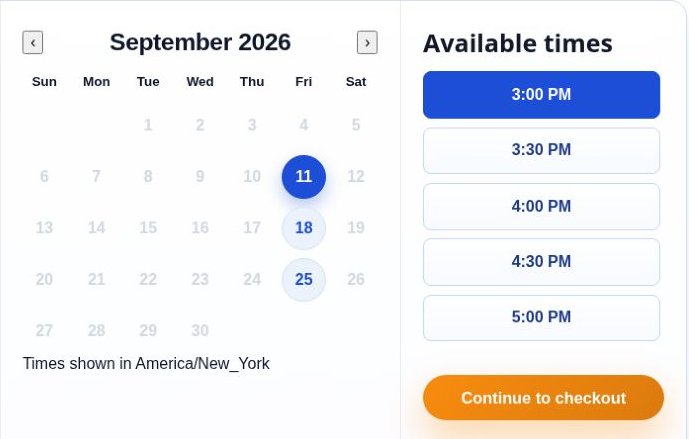
Tutoring booking calendar and time selection interface.
Booking notice windows protect your working time
A booking notice window controls how close to the session a family can book.
For example, you might require 24 hours' notice for a private lesson. That rule prevents a family from selecting a time while you are already preparing for another session. You can also block specific dates without deleting your normal weekly availability.
Your weekly schedule stays intact. The exception applies only where you need it.
This is a practical part of educator scheduling software. You are not rebuilding your calendar every time your availability changes. You are setting the normal pattern once and adjusting the dates that differ.
Offer one-time, weekly, or monthly sessions
Tutoring businesses rarely operate in only one format. One family may need a single assessment. Another may want a weekly lesson. A third may prefer a monthly billing arrangement for ongoing sessions.
IEPro supports each of these booking options.
One-time private lessons
Use a one-time session for:
- An introductory lesson
- A subject assessment
- Exam preparation
- A single consultation
- A one-off academic support session
The family selects the available date and time, adds the learner, and completes the one-time payment.
Weekly recurring sessions
Weekly recurring sessions work when a learner meets with you at a regular interval. The family chooses the recurring option and follows the checkout process for the ongoing arrangement.
The enrollment, schedule, and recurring payment remain connected. You do not need to create a new payment request for each lesson.
Monthly recurring sessions
Monthly billing can suit families who prefer one predictable payment each month. You can configure the offer around your own pricing and session structure.
Billing frequency and teaching frequency do not have to be the same. You can run weekly lessons while allowing families to pay monthly, where your offer supports that arrangement.
That distinction matters for a private tutor management platform. Your lesson schedule should reflect when you teach. Your billing setting should reflect how your business charges.
The parent booking flow stays clear
The family-facing process should be short and easy to verify.
1. The parent opens your branded booking page
The booking page appears under your educator brand. You can use IEPro as your full educator website and blog, or connect your existing website to your IEPro offer.
You are not sending the family to a marketplace listing. You control the page, the presentation, the pricing, and the booking terms.
2. The parent chooses the session option
The family selects the relevant tutoring or private lesson option. They can see the session details, price, booking notice, and available choices before continuing.
If you offer one-time, weekly, or monthly options, the family selects the structure that applies to their needs.
3. The parent selects or adds the learner
The parent identifies the learner who will attend the session. IEPro keeps parent and learner records connected, so the booking includes the information you need to manage the lesson.
If a parent manages more than one learner, the learner selection helps keep each enrollment and session record accurate.
4. The parent picks an open time
The booking screen displays available times based on your weekly hours, booking notice rules, blocked dates, and date exceptions.
The family selects an open session instead of emailing back and forth to ask whether you are free.
5. The parent pays through Stripe
The family completes checkout through Stripe. IEPro does not process payments itself. Stripe handles payment processing and Stripe Connect payouts. Stripe fees apply per transaction.
After a successful payment, the relevant booking or enrollment becomes active. The session remains connected to the learner record, schedule, and enrollment history.
6. The family receives confirmation and reminders
IEPro sends automated confirmation and reminder emails according to the booking workflow.
The family receives a clear record of the session. You keep the session details in your connected system instead of manually sending a second confirmation from another tool.
One system underneath the booking
A successful tutoring booking should update more than a payment record.
It should also keep the session, learner, parent, schedule, and enrollment history aligned.
IEPro connects:
- The parent and learner record
- The selected session time
- The booking or enrollment status
- The payment status
- The session or roster record
- The schedule
- Automated confirmation and reminder emails
- Enrollment history
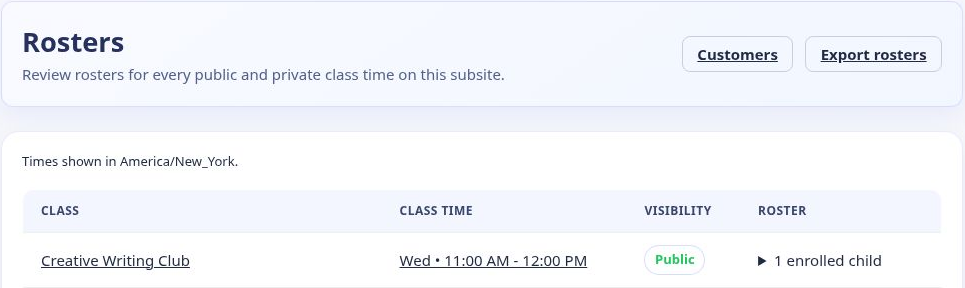
IEPro roster overview showing a scheduled class time and enrolled learner.
For a one-to-one lesson, you can set the session cap to one learner. For a small-group tutoring offer, you can use the appropriate seat limit. The system keeps the available capacity connected to the booking record and releases a seat when a cancellation ends the enrollment, where applicable.
You should not have to update six other tools after one parent completes checkout.
What happens when a booking changes?
Tutoring schedules change. A family may need to reschedule. A learner may cancel. A payment may fail. Your booking system should make those states visible without forcing you to reconstruct the record manually.
If a family reschedules
The relevant schedule and enrollment information can be updated according to your configured workflow. The new session time should remain associated with the correct learner and parent record.
Your booking notice and availability rules still apply. Families do not see times you have blocked or times that fall outside your booking window.
If a family cancels
The enrollment or booking can end according to your cancellation policy. The associated seat can become available again where applicable, and the cancellation remains part of the enrollment history.
You retain control over the policy and the communication you provide.
If a learner does not attend
You can keep the scheduled session in your records and apply your own no-show policy. The booking history gives you a clear reference for the session that was reserved, whether the learner attended, canceled, or did not attend.
If a payment fails
IEPro keeps the payment state connected to the enrollment and can place the enrollment into payment-recovery handling according to your configured policy.
You do not need to search through separate payment records to determine which learner's recurring session needs attention.
Follow up with interested families
Not every parent books immediately. A family may ask about subject fit, availability, or the right session format before choosing a time.
IEPro includes Connect, a parent interest pipeline for tracking conversations, follow-ups, and enrollment links. You can keep the inquiry connected to the rest of your tutoring business instead of leaving it in an unrelated inbox.
This makes the platform more than a booking page. It supports the path from parent interest to scheduled lesson.
Choose tutoring business software that matches your operation
You may run tutoring, recurring classes, workshops, and self-paced programs from the same educator business. IEPro supports those formats under your own brand.
That gives you one place to manage:
- Tutoring and private lessons
- Recurring classes
- Set-length programs
- One-time classes and workshops
- Self-paced programs
- Parent interest and follow-up
- Website and blog content
- Checkout, billing, schedules, rosters, and reminders
You can use IEPro as your online teaching business platform, or keep your existing website and link families to your IEPro booking and enrollment pages.
Pricing
30 days free
Then $97/month.
Nothing charged today.
Your card is not charged until the 30-day trial ends.
Cancel anytime.
The subscription includes tutoring and private lesson tools, recurring and one-time offers, your educator website and blog, parent and learner records, schedules, rosters, reminders, Connect follow-up tools, and the other core features of the IEPro platform.
Stripe processing fees apply per transaction. IEPro does not guarantee students or provide marketplace traffic.
Visit Independent Educator Pro
Frequently asked questions
Is IEPro tutor booking software or a general class platform?
It supports tutoring and private lessons alongside recurring classes, set-length programs, one-time workshops, and self-paced programs. You can manage different formats inside the same educator business.
Can families book one-time and recurring tutoring sessions?
Yes. IEPro supports one-time, weekly recurring, and monthly recurring tutoring or private lesson sessions.
Can I control when families are allowed to book?
Yes. You can set your regular availability, booking notice requirements, blocked dates, and date exceptions. Families see available times based on those settings.
Does IEPro process tutoring payments?
No. Stripe handles checkout and Stripe Connect handles educator payouts. Stripe fees apply per transaction.
Does a booking update my roster and records?
A successful booking updates the relevant enrollment, learner and parent records, schedule, and session or roster information. Automated confirmation and reminder emails support the same workflow.
Can I keep my existing website?
Yes. You can use IEPro as your full educator website and blog, or keep your current website and link families to your IEPro booking and enrollment pages.
How much does IEPro cost?
IEPro is free for 30 days, then $97/month. Nothing is charged today, and you can cancel anytime.